
Use Bluefy To Continue

This updater needs a browser that can talk to your knife over Bluetooth. On iPhone and iPad, regular browsers like Safari and Chrome do not allow that connection for this tool.

If you have an Android, Windows, or Mac device, you can run the Tuneup process without any additional downloads.

Bluefy is a browser for iPhone and iPad that supports the Bluetooth features this updater needs. Once you open Tuneup in Bluefy, everything else will work normally.

  1. Download Bluefy from the App Store.
  2. Visit this Tuneup page in Bluefy and continue there.

After opening this page in Bluefy, you will return to the normal Tuneup flow.

Download Bluefy

Seattle Ultrasonics Tuneup

End User Licence Agreement (EULA)

Seattle Ultrasonics

Tuneup

Device not compatible

This updater requires Web Bluetooth in a supported browser and device.

  • Use Chrome, Edge, or another browser that supports Web Bluetooth
  • Use a desktop computer, Android device, or Bluefy on iPhone or iPad
  • Most current desktop and laptop computers are compatible
Connected knife
Device name Not connected
Firmware version --

Before you start

This tool connects to your knife using Bluetooth.

Knife disconnected after a period of inactivity.

  • Charge the knife above 50%
  • Keep the knife close to this device
  • Do not remove the battery during a task
  • Use Chrome or Edge, or Bluefy on iPhone or iPad
Connect your knife

1 Click Connect

2 Remove and re-insert your battery

Your browser does not support the battery insertion video.

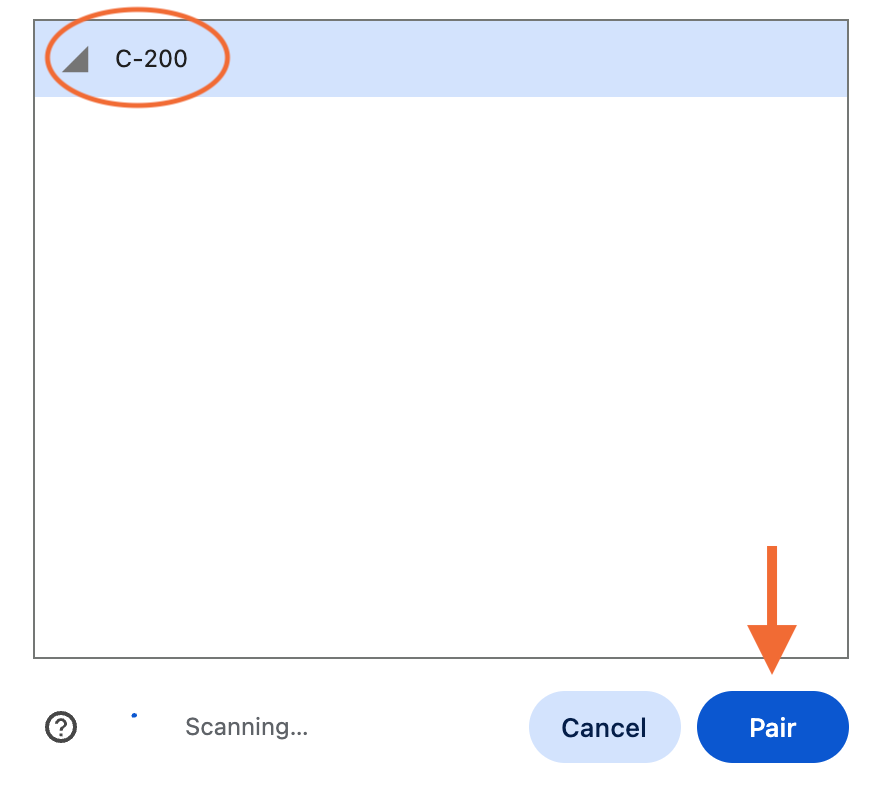
3 Select your device from the list

Bluetooth pairing window screenshot

Choose a task

Step 1 of 3 Choose firmware

Run task

Follow the prompts below.

No compatible firmware entries available for this knife.

Reconnect knife

Remove and re-insert the battery, then reconnect.

0% 0 kB/s Waiting for update start

1. Select a tuning target

Your knife supports multiple tuning targets. Choose one below, you can always change it later.

2. Hold the knife button to retune

Your knife may briefly make a high pitched noise during tuning.
Not started
Original: -- Hz

Select a frequency below. The selected frequency is applied immediately so you can test with the knife button, then save your preferred option.

Press and hold the knife button to start diagnostics. Keep holding while diagnostics runs.

Diagnostics will pause if you release the knife button early.

Center frequency --
Battery voltage --
Temperature --
Not started

Session log

Need help? Keep the knife powered and nearby. If a task fails, reconnect and try again.
Questions: hello@seattleultrasonics.com.
Supported browsers: Chrome and Edge (desktop + Android).
Dev info
Device ID --
Hardware rev --
Serial --
Model --
Center frequency --
Power --
Battery --
Temperature --
Odometer --
Original center --
Coarse peak --
Fine peak --
Change --
Firmware update
Retune
Diagnostic report
Obfuscation
Idle timeout